
 antirez
f26954d8ff
Screenshot added.
antirez
f26954d8ff
Screenshot added.
|
преди 3 години | |
|---|---|---|
| images | преди 3 години | |
| LICENSE | преди 3 години | |
| README.md | преди 3 години | |
| TODO | преди 3 години | |
| app.c | преди 3 години | |
| app.h | преди 3 години | |
| app_buffer.c | преди 3 години | |
| app_buffer.h | преди 3 години | |
| app_subghz.c | преди 3 години | |
| appicon.png | преди 3 години | |
| application.fam | преди 3 години | |
| proto.c | преди 3 години |

README.md
ProtoView is a digital signal detection and visualization tool for the Flipper Zero. The Flipper is able to identify a great deal of RF protocols, however when the exact protocol is not implemented (and there are many proprietary ones, such as the ones of the car keys), the curious person is left wondering what the device is sending at all. With ProtoView in can visualize the high and low pulses like in the example image below (showing a Volkswagen key in 2FSK):
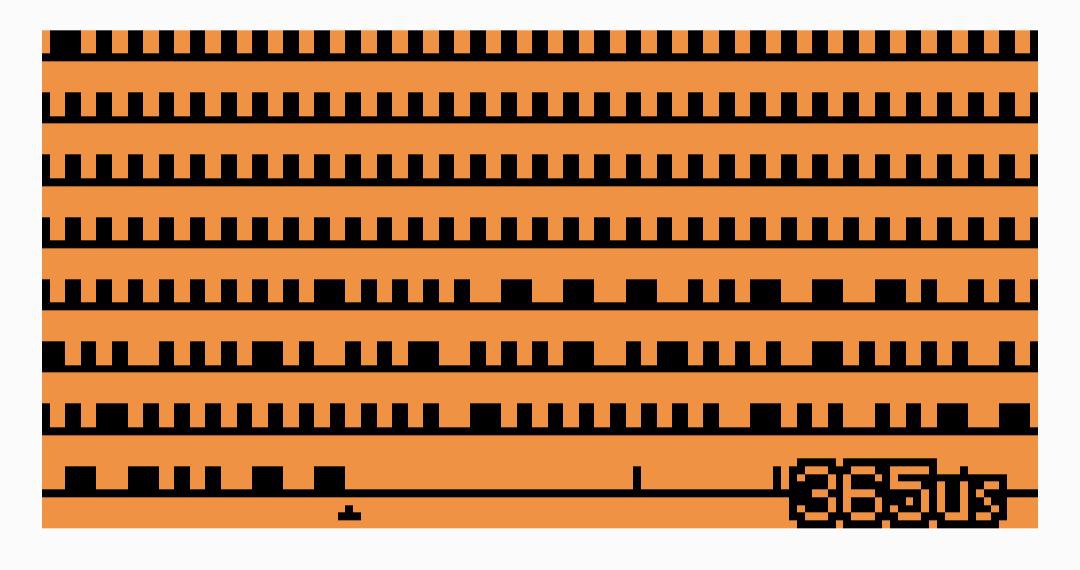
This is often enough to make an initial idea about the encoding used and if the selected modulation is correct.
The secondary goal of ProtoView is to provide a somewhat-documented application for the Flipper (even if ProtoView is a pretty atypical application: does not sue the standard widgets and other abstractions provded by the framework). Many apps dealing with the subghz subsystem (the Flipper abstraction to work with the CC1101 chip) tend to be complicated and completely undocumented. This is unfortunately true for the firmware of the device itself. It's a shame because especially in the case of code that talks with hardware peripherals there are tons of assumptions and hard-gained lessons that can only be captured by comments and are in the code only implicitly.
Detection algorithm
In order to show unknown signals, the application attempts to understand if the samples obtained by the Flipper API (a series of pulses that are high or low, and with different duration in microseconds) look like belonging to a legitimate signal, and aren't just noise. We can't make assumptions about the encoding and the data rate of the communication, so we use a simple but relatively effective algorithm. As we check the signal, we try to detect long parts of it that are composed of pulses roughly classifiable into a maximum of three different classes of lengths, plus or minus 10%. Most encodings are somewhat self-clocked, so they tend to have just two or three classes of signal lengths.
Usage
The application shows the longest coherent signal detected so far.
- The OK button resets the current signal.
- The UP and DOWN buttons change the scale. Default is 100us per pixel.
- The LEFT and RIGHT buttons switch to settings.
Under the detected sequence, you will see a small triangle marking a specific sample. This mark means that the sequence looked coherent up to that point, and starting from that could be just noise.
Things to investigate:
- Many cheap remotes (gate openers, remotes, ...) are on the 433.92Mhz or nearby and use OOK modulation.
- Weather stations are often too in the 433.92Mhz OOK.
- For car keys, try 443.92 OOK650 and 868.35 Mhz in OOK or 2FSK.
Installing the app on the flipper
Download the Flipper Zero dev kit and build it:
mkdir -p ~/flipperZero/official/
cd ~/flipperZero/official/
git clone --recursive  https://github.com/flipperdevices/flipperzero-firmware.git  ./
./fbt
Copy this application folder in
official/application_user.Connect your Flipper via USB.
Build and install with:
./fbt launch_app APPSRC=protoview.
License
The code is released under the BSD license.
Disclaimer
This application is only provided as an educational tool. The author is not liable in case the application is used to reverse engineer protocols protected by IP or for any other illegal purpose.