
 Aaron Mavrinac
a27b41c611
Merge pull request #22 from ezod/mph
Aaron Mavrinac
a27b41c611
Merge pull request #22 from ezod/mph
|
vor 2 Jahren | |
|---|---|---|
| .github | vor 3 Jahren | |
| lib | vor 3 Jahren | |
| .gitignore | vor 3 Jahren | |
| .gitmodules | vor 3 Jahren | |
| LICENSE | vor 4 Jahren | |
| README.md | vor 3 Jahren | |
| application.fam | vor 3 Jahren | |
| constants.h | vor 2 Jahren | |
| gps.c | vor 2 Jahren | |
| gps_10px.png | vor 4 Jahren | |
| gps_uart.c | vor 3 Jahren | |
| gps_uart.h | vor 2 Jahren | |
| ui.png | vor 3 Jahren | |
| wiring.png | vor 3 Jahren |


README.md
GPS for Flipper Zero

A simple Flipper Zero application for NMEA 0183 serial GPS modules, such as the Adafruit Ultimate GPS Breakout.
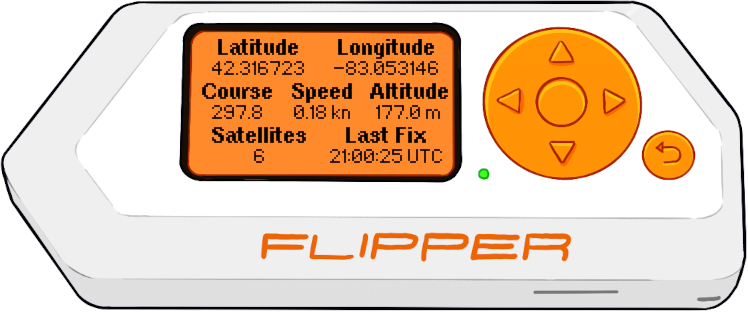
Heavy lifting (NMEA parsing) provided by minmea.
Installation
- Navigate to the FAP Build GitHub action workflow, and select the most recent run.
- The FAP is built for both the
devandreleasechannels of the official firmware. Download the artifact corresponding to your firmware version. - Extract
gps_nmea.fapfrom the ZIP file toapps/GPIOon your Flipper Zero SD card.
Usage
This is a single-screen app, and a few interactions are provided via the hardware buttons:
- Long press the up button to change the baud rate. The default baud rate is 9600, but 19200, 38400, 57600, and 115200 baud are also supported.
- Long press the right button to change speed units from knots to kilometers per hour.
- Press the OK button to set the backlight to always on mode. Press it again to disable.
- Long press the back button to exit the app.
Hardware Setup
Connect the GPS module to power and the USART using GPIO pins 9 (3.3V), 11 (GND), 13 (TX), and 14 (RX), as appropriate.
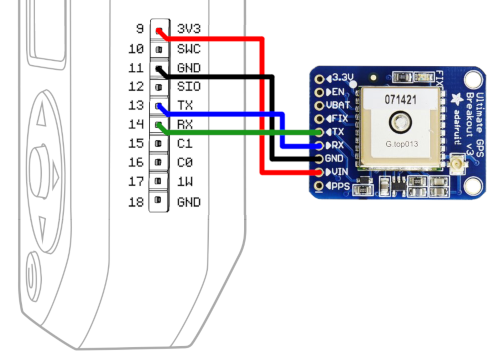
See the tutorial video from Lab401 by RocketGod for a visual guide to the hardware setup.
Confirmed Compatible Modules
- Adafruit Ultimate GPS Breakout
- Beitian BN-180
- Royaltek RBT-2100LP
- u-blox NEO-6M
If you have verified this application working with a module not listed here, please submit a PR adding it to the list.
Building
This application can be compiled using uFBT. Run ufbt in the root directory
of the repository.