
 rdefeo
84b8067861
many new features
rdefeo
84b8067861
many new features
|
1 год назад | |
|---|---|---|
| .github | 1 год назад | |
| assets | 1 год назад | |
| images | 1 год назад | |
| nxjson | 1 год назад | |
| screenshots | 1 год назад | |
| .gitignore | 1 год назад | |
| CHANGELOG.md | 1 год назад | |
| README.md | 1 год назад | |
| README_flipperlab.md | 1 год назад | |
| application.fam | 1 год назад | |
| graphics.cxx | 1 год назад | |
| graphics.h | 1 год назад | |
| notifications.cxx | 1 год назад | |
| notifications.h | 1 год назад | |
| objects.cxx | 1 год назад | |
| objects.h | 1 год назад | |
| pinball0.cxx | 1 год назад | |
| pinball0.h | 1 год назад | |
| pinball0.png | 1 год назад | |
| table.cxx | 1 год назад | |
| table.h | 1 год назад | |
| vec2.cxx | 1 год назад | |
| vec2.h | 1 год назад |

README.md
Pinball0 (Pinball Zero)
Play pinball on your Flipperzero!
This is a BETA release!! Still a work in progress...
The default tables and example tables may / will change
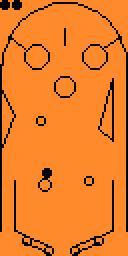
Screenshots



Features
- Realistic physics and collisions
- User-defined tables via JSON files
- Bumpers, flat surfaces, curved surfaces
- Scores! (no high scores yet, just a running tally as you play)
- Table bumps!
- Portals!
- Rollover items
- Sounds! Blinky lights! Annoying vibrations!
- Customizable notification settings: sound, LED, vibration
Controls
- Ok to release the ball
- Left and Right to activate the left and right flippers
- Back to return to the main menu or exit
- Up to "bump" the table if the ball gets stuck
I find it easiest to hold the flipper with both hands so I can hit left/right with my thumbs!
Settings
The SETTINGS menu will be the "last" table listed. You can Enable / Disable the following: Sound, LED light, Vibration, and Manual mode. Move Up/Down to select your setting and press OK to toggle. Settings are saved in /data/.pinball0.conf as a native Flipper Format file. Back will return you to the main menu.
Manual mode allows you to move the ball using the directional pad before the ball is launched. This is useful for testing and may be removed in the future. May result in unexpected behavior.
Tables
Pinball0 ships with several default tables. These tables are automatically deployed into the assets folder (/apps_data/pinball0). Tables are simple JSON which means you can define your own! Your tables should be stored in the data folder (/apps_data/pinball0). The default tables may change over time.
File Format
Table units are specified at a 10x scale. This means our table is 630 x 1270 in size (as the F0 display is 64 pixels x 128 pixels). Our origin is in the top-left at 0, 0. Check out the default tables in the assets/tables folder for example usage.
The JSON can include comments - because why not!
DISCLAIMER: The file format may change from release to release. Sorry. There is some basic error checking when reading / parsing the table files. If the error is serious enough, you will see an error message in the app. Otherwise, check the console logs. For those familiar with
ufbt, simply runufbt cliand issue thelogcommand. Then launch Pinball0. All informational and higher logs will be displayed.
lives : object (optional)
Defines how many lives/balls you start with, and display information
"display": bool: optional, defaults to false"position": [ X, Y ]"value": N: Number of balls - optional, defaults to 3"align": A: optional, defaults to"HORIZONTAL"(also,"VERTICAL")
balls : list of objects
Every table needs at least 1 ball, otherwise it will fail to load.
"position": [ X, Y ]"velocity": [ VX, VY ]: optional, defaults to[ 0, 0 ]. The default tables have an initial velocity magnitude in the 10-18 range. Test your own values!"radius" : N: optional, defaults to20
score : object (optional)
"display" : bool: optional, defaults to false"position" : [ X, Y ]: optional, defaults to[ 63, 0 ]
The position units are in absolute LCD pixels within the range [0..63], [0..127].
flippers : list of objects (optional)
"position": [ X, Y ]: location of the pivot point"side": S: valid values are"LEFT"or"RIGHT""size": N: optional, defaults to120
You can have more than 2 flippers! Try it!
bumpers : list of objects (optional)
"position": [ X, Y ]"radius": [ N ]: optional, defaults to40
rails : list of objects (optional)
"start": [ X, Y ]"end": [ X, Y ]"double_sided": bool: optional, defaults tofalse
The "surface" of a rail is "on the left" as we move from the "start" to the "end". This means that when thinking about your table, the outer perimiter should be defined in a counter-clockwise order. Arriving at a rail from it's revrese side will result in a pass-through - think of it as a one-way mirror.
arcs : list of objects (optional)
"position": [ X, Y ]"radius" : N"start_angle": N: in degrees from 0 to 360"end_angle": N: in degreens from 0 to 360"surface": S: valid values are"INSIDE"or"OUTSIDE"
Start and End angles should be specified in counter-clockwise order. The surface defines which side will bounce/reflect.
rollovers : list of objects (optional)
"position": [ X, Y ]"symbol": C: where C is a string representing a single character, like"Z"
When the ball passes over/through a rollover object, the symbol will appear. Only the first character of the string is used.
portals : list of objects (optional)
"a_start": [ X, Y]"a_end": [ X, Y]"b_start": [ X, Y]"b_end": [ X, Y]
Defines two portals, a and b. They are bi-drectional. Like rails, their "surface" - or in this case, their "entry surface" - is "on the left" from their respective start to end direction. You can't "enter" a portal from it's reverse side, you will pass through.