
README.md 3.9 KB
[UHF]RFID App for FlipperZero


Overview
This repository contains a UHF RFID application developed for FlipperZero, a versatile multi-tool device. The app leverages the YRM100 module to enable UHF RFID functionality.
Current Status
Working on the settings page to allow for changing of the module's settings. Adding options like settings the access password, baud rate, rf power, channel, etc.
What's Changed
- A complete refractor from the concept code to covert to a framework. So that it's easy to refractor for different possible module's. See module.h for more info.
- Reading bank now can automatically detect bank size, for cases that PC(protocol control) bits aren't properly written to tag.
- Can now view tag from saved.
- Can now write tags from saved.
- Icon added by @xMasterX
- App is now named
[(Q)M100] UHF RFID, meaning for M100 and QM100 modules
Features
- Read Single UHF RFID tag.
- View saved UHF RFID tag.
- Write Single UHF RFID tag.
- Change Module setting parameters. (In Progress)
- Set/Reset Access Password
- Set Kill Password
- Kill Tag
- TBD
- Edit/Create new data to write.
- Extras
- Read multiple tags at once
- View multiple on a list view
Requirements
To run this application on FlipperZero, you will need:
- FlipperZero device (purchase from Flipper Devices)
- YRM100 UHF RFID module (purchase from Ali-Express)
Setup and Installation
- Ensure you have set up your FlipperZero device with the YRM100 module properly. You can also read more about how to setup the module from the Md5Stack Docs page.
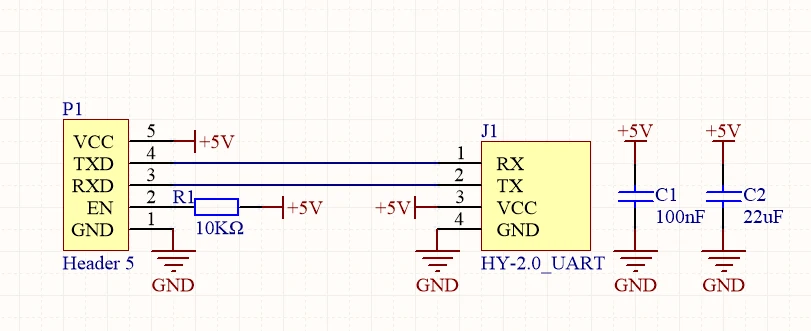
- Clone this repository to the
applications_userfolder of your flipper firmware of your choice - If you have VSCode setup with your flipper firmware.
- ### Windows
- Press
Ctrl+Shift+Bon vscode while in the uhf_app folder - Select the
Launch App on Flipperoption. And watch as the app launches on your flipper - If you don't have vscode setup you can use the cli command
./fbt COMPACT=1 DEBUG=0 launch APPSRC=applications_user\uhf_rfid
- Press
- ### MacOS ... tbd
- ### Windows
Usage
- Power on your FlipperZero device.
- Connect the uhf module to the flipper via gpio.
- Navigate to the UHF RFID app on FlipperZero's menu.
- Currently Reading the EPC tag is the only usable option ... will further update this page as it development goes
Contributions
As this app is still in the development stage, I welcome contributions to this project. If you find any issues or want to enhance the application, feel free to create a pull request.
Disclaimer
- This application is provided as-is and may contain bugs or issues.
- Use it at your own risk.
- I am not responsible for any damage or loss caused by the usage of this app.
Extra Resources
Contact
For any inquiries or support, you can reach out to us at :
- Personal Email : frux.infoc@gmail.com
- Discord Server: Flipper Zero Tutorial-Unoffical by @jamisonderek
- Discord User: [frux.c]()