
README.md 2.5 KB
[UHF]RFID App for FlipperZero

Overview
This repository contains a UHF RFID application developed for FlipperZero, a versatile multi-tool device. The app leverages the YRM100 module to enable UHF RFID functionality.
Features
- Read UHF RFID tags.
- Write UHF RFID tags.
- Communicate with the YRM100 module to perform UHF RFID operations.
- Easy-to-use interface on FlipperZero's display.
Requirements
To run this application on FlipperZero, you will need:
- FlipperZero device (purchase from Flipper Devices)
- YRM100 UHF RFID module (purchase from Ali-Express)
Installation
- Ensure you have set up your FlipperZero device with the YRM100 module properly. You can also read more about how to setup the module from the Md5Stack Docs page.
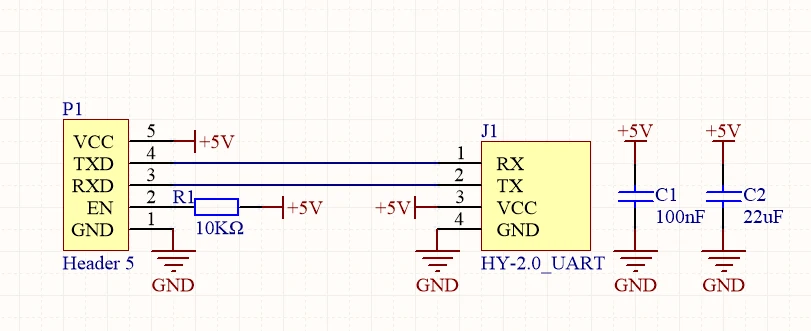
- Clone this repository to the
applications_userfolder of your flipper firmware of your choice - If you have VSCode setup with your flipper firmware.
- ### Windows
- Press
Ctrl+Shift+Bon vscode while in the uhf_app folder - Select the
Launch App on Flipperoption. And watch as the app launches on your flipper - If you don't have vscode setup you can use the cli command
./fbt COMPACT=1 DEBUG=0 launch APPSRC=applications_user\uhf_rfid
- Press
- ### Windows
Usage
- Power on your FlipperZero device.
- Navigate to the UHF RFID app on FlipperZero's menu.
- (Add detailed instructions on how to use the UHF RFID app)
Contributions
As this app is still in the development stage, I welcome contributions to this project. If you find any issues or want to enhance the application, feel free to create a pull request.
Disclaimer
- This application is provided as-is and may contain bugs or issues.
- Use it at your own risk.
- I am not responsible for any damage or loss caused by the usage of this app.
Extra Resources
Contact
For any inquiries or support, you can reach out to us at :
- Personal Email : frux.infoc@gmail.com
- Discord Server: Flipper Zero Tutorial-Unoffical by @jamisonderek
- Discord User: [frux.c]()