Willy-JL
337177af64
Infrared: Use new settings loading
Willy-JL
337177af64
Infrared: Use new settings loading
|
1 год назад | |
|---|---|---|
| .. | ||
| images | 2 лет назад | |
| .gitsubtree | 1 год назад | |
| README.md | 2 лет назад | |
| application.fam | 2 лет назад | |
| example.txt | 2 лет назад | |
| infrared_remote.c | 2 лет назад | |
| infrared_remote.h | 2 лет назад | |
| infrared_remote_app.c | 1 год назад | |
| infrared_remote_button.c | 2 лет назад | |
| infrared_remote_button.h | 2 лет назад | |
| infrared_signal.c | 2 лет назад | |
| infrared_signal.h | 2 лет назад | |
| ir.png | 2 лет назад | |
| ir2.png | 2 лет назад | |
| ir_10px.png | 2 лет назад | |


README.md
Alternative Infrared Remote for Flipperzero
It is a plugin like UniversalRF Remix but for infrared files. I do this plugin for convenience, because the main IR app need to navigate for different button abit troublesome (buttons like up,down,left,right,back). I found it useful for TV and TV box.
It supports short press and long press input for different ir remote buttons. Tested on the unleashed firmware version unlshd-023
How to install
Update unleashed firmware to the version unlshd-023, then download the
ir_remote.fapfrom releasesPut the
ir_remote.fapfile in your flipper's SD card, underappsfolder
How to use
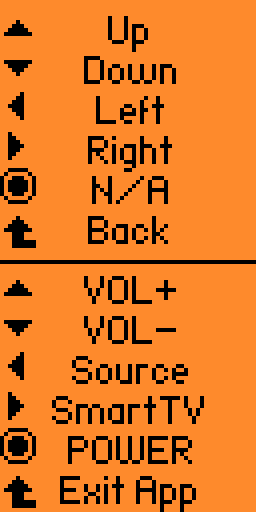
- Similar to UniRF app, put the path of the ir file and the ir button for each button on flipper (UP,DOWN,LEFT,RIGHT,BACK)
The format With HOLD one is long press, without is short press
Example of the configuration file:
REMOTE: /ext/infrared/Philips_32PFL4208T.ir
UP: Up
DOWN: Down
LEFT: Left
RIGHT: Right
OK:
BACK: Back
UPHOLD: VOL+
DOWNHOLD: VOL-
LEFTHOLD: Source
RIGHTHOLD: SmartTV
OKHOLD: POWER
Leave it empty for the button you don't need
Save it as
.txtfile, then create a new folder in your SD cardir_remote, put it inside the folderLastly, you can open the app, choose the configuration file, then you can try out the ir for each buttons
Long press back button to exit the app
How to build
You can clone this repo and put it inside the applications_user folder, then build it with the command:
./fbt fap_ir_remote
Or you can build and run it on your flipper with the command:
./fbt launch_app APPSRC=applications_user/ir_remote
Screenshots
Choose config file to map

Show all button name in the config file (If empty will show N/A). Upper part short press, Lower part long press