Flipper Zero: MTP
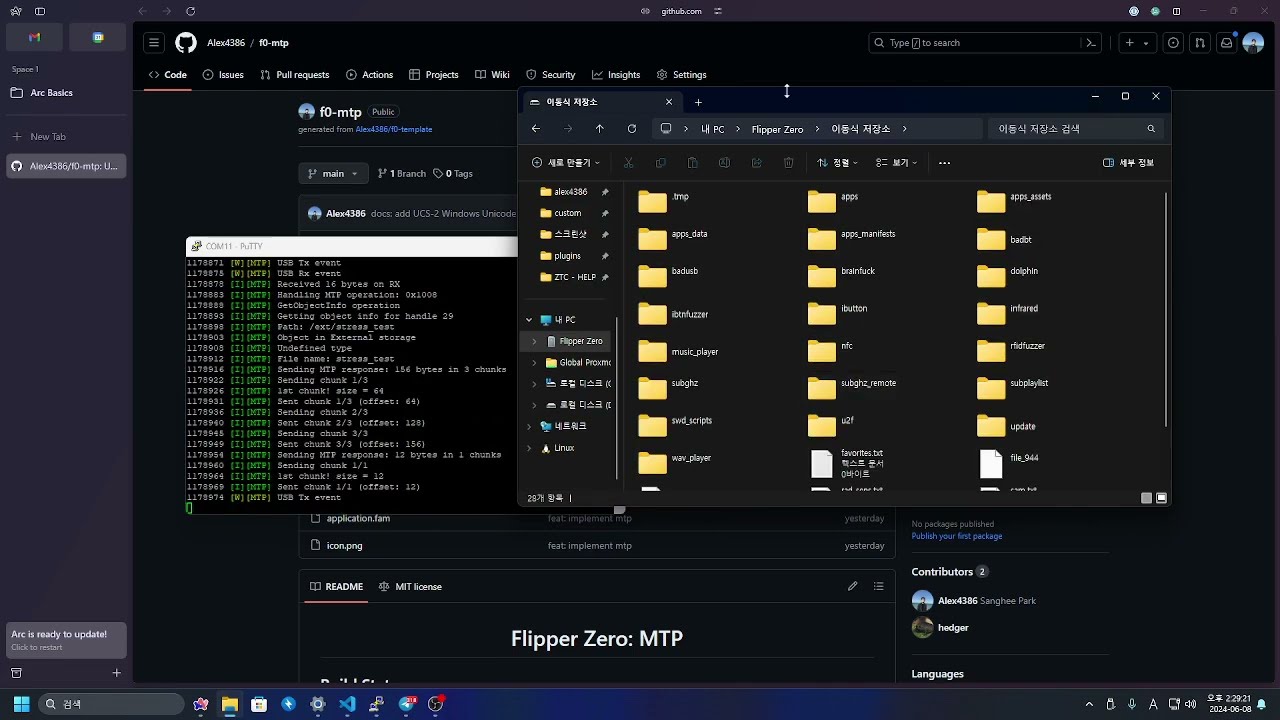
See this in action on YouTube!
 ## Build Status
- **Latest Release**: [Download](https://github.com/Alex4386/f0-mtp/releases/latest)
- **Latest Nightly**: [Download](https://github.com/Alex4386/f0-mtp/actions/workflows/nightly.yml) _(GitHub Login Required)_
| Nightly Build | Release Build |
| :------------------------------------------------------------------------------------------: | :------------------------------------------------------------------------------------------: |
|  |  |
## What is this?
`f0-mtp` is a application that implements [`MTP (Media Transfer Protocol)` defined by `USB-IF`](https://www.usb.org/document-library/media-transfer-protocol-v11-spec-and-mtp-v11-adopters-agreement) on Flipper Zero.
This allows you to access the Flipper Zero's internal and SD card storages from your computer without the need of any additional drivers like [`HID-File-Transfer`](https://github.com/Kavakuo/HID-File-Transfer).
If your computer can handle Android devices, it should be able to handle Flipper Zero as well with this application.
Due to limitation of the Flipper Zero's hardware, The MTP connection utilizes `Full Speed` USB, which is USB 1.1 (12Mbps). which may be slow™.
> [!NOTE]
> Flipper Zero utilizes `SPI` for SD card, which speed is limited to around 1MB/s.
> So, the speed of the MTP connection probably will not the bottleneck here.
> So, If you need quick copy, Use a proper SD Card Reader.
### Before using...
Here are some things you should know before using this application:
> [!WARNING]
> **DO NOT transfer files over 64K** in one go.
> This will:
>
> - **Crash the Flipper** if the file is too big.
>
> And _might_ :
>
> - **Corrupt the SD Card filesystem** due to current implementation's limitation.
> (If you know how to fix this issue, feel free to give me a PR!, quick `chkdsk` will fix the corruption though)
> [!WARNING]
> **DO NOT** use `UNICODE` characters in the file/directory names.
> Flipper Zero's filesystem isn't designed to handle `UNICODE` characters. such as:
>
> - `한글.txt`
> - `日本語.txt`
> - `中文.txt`
### Features
- Access Internal and SD card storages
- List files and directories
- Navigate directories
- Opening Files (Downloading Flipper files into Computer)
- Large file transfer now **WORKS**!
- It didn't work since the header did not have proper `size` defined, ignoring the further packets.
- Now utilizing even less memory via `streaming` support!
- Move Files into Flipper
- **NEW!** Now you can upload files to Flipper Zero!
- **Note:** Flipper Zero has limited memory, please refrain from moving files bigger than 64K on one go. (for me 80K was a hard limit)
- Deleting Files/Directories
- Move Files/Directories
- Create Directories (Renaming not supported)
- Actual **Serial Number**, **Model Name**, **Firmware Version** is now shown in the MTP client.
### Known Issues
- Renaming directories, files are not supported yet.
- Fix "memory leaks"
- TODO: Buy Wi-Fi Development Board for Remote GDB Attachment
## How to build
See [HOW_TO_BUILD.md](HOW_TO_BUILD.md) for more information.
## Special Thanks
- [viveris/uMTP-Responder](https://github.com/viveris/uMTP-Responder)
- [yoonghm/MTP](https://github.com/yoonghm/MTP)
**and Special NOT Thanks to**:
- [Microsoft](https://microsoft.com) for making the [MTP Spec](https://www.usb.org/document-library/media-transfer-protocol-v11-spec-and-mtp-v11-adopters-agreement) so hard to understand. `>:(`
- [Microsoft](https://microsoft.com) for reserving place for programmers to live in `WideChar` and `MultiByte` hellscape. `>:(`
## License
This project is licensed under the MIT License - see the [LICENSE](LICENSE) file for details.
## Build Status
- **Latest Release**: [Download](https://github.com/Alex4386/f0-mtp/releases/latest)
- **Latest Nightly**: [Download](https://github.com/Alex4386/f0-mtp/actions/workflows/nightly.yml) _(GitHub Login Required)_
| Nightly Build | Release Build |
| :------------------------------------------------------------------------------------------: | :------------------------------------------------------------------------------------------: |
|  |  |
## What is this?
`f0-mtp` is a application that implements [`MTP (Media Transfer Protocol)` defined by `USB-IF`](https://www.usb.org/document-library/media-transfer-protocol-v11-spec-and-mtp-v11-adopters-agreement) on Flipper Zero.
This allows you to access the Flipper Zero's internal and SD card storages from your computer without the need of any additional drivers like [`HID-File-Transfer`](https://github.com/Kavakuo/HID-File-Transfer).
If your computer can handle Android devices, it should be able to handle Flipper Zero as well with this application.
Due to limitation of the Flipper Zero's hardware, The MTP connection utilizes `Full Speed` USB, which is USB 1.1 (12Mbps). which may be slow™.
> [!NOTE]
> Flipper Zero utilizes `SPI` for SD card, which speed is limited to around 1MB/s.
> So, the speed of the MTP connection probably will not the bottleneck here.
> So, If you need quick copy, Use a proper SD Card Reader.
### Before using...
Here are some things you should know before using this application:
> [!WARNING]
> **DO NOT transfer files over 64K** in one go.
> This will:
>
> - **Crash the Flipper** if the file is too big.
>
> And _might_ :
>
> - **Corrupt the SD Card filesystem** due to current implementation's limitation.
> (If you know how to fix this issue, feel free to give me a PR!, quick `chkdsk` will fix the corruption though)
> [!WARNING]
> **DO NOT** use `UNICODE` characters in the file/directory names.
> Flipper Zero's filesystem isn't designed to handle `UNICODE` characters. such as:
>
> - `한글.txt`
> - `日本語.txt`
> - `中文.txt`
### Features
- Access Internal and SD card storages
- List files and directories
- Navigate directories
- Opening Files (Downloading Flipper files into Computer)
- Large file transfer now **WORKS**!
- It didn't work since the header did not have proper `size` defined, ignoring the further packets.
- Now utilizing even less memory via `streaming` support!
- Move Files into Flipper
- **NEW!** Now you can upload files to Flipper Zero!
- **Note:** Flipper Zero has limited memory, please refrain from moving files bigger than 64K on one go. (for me 80K was a hard limit)
- Deleting Files/Directories
- Move Files/Directories
- Create Directories (Renaming not supported)
- Actual **Serial Number**, **Model Name**, **Firmware Version** is now shown in the MTP client.
### Known Issues
- Renaming directories, files are not supported yet.
- Fix "memory leaks"
- TODO: Buy Wi-Fi Development Board for Remote GDB Attachment
## How to build
See [HOW_TO_BUILD.md](HOW_TO_BUILD.md) for more information.
## Special Thanks
- [viveris/uMTP-Responder](https://github.com/viveris/uMTP-Responder)
- [yoonghm/MTP](https://github.com/yoonghm/MTP)
**and Special NOT Thanks to**:
- [Microsoft](https://microsoft.com) for making the [MTP Spec](https://www.usb.org/document-library/media-transfer-protocol-v11-spec-and-mtp-v11-adopters-agreement) so hard to understand. `>:(`
- [Microsoft](https://microsoft.com) for reserving place for programmers to live in `WideChar` and `MultiByte` hellscape. `>:(`
## License
This project is licensed under the MIT License - see the [LICENSE](LICENSE) file for details.